Play Ludo offlineOne phone. Full war.

Ludo Fighters is built for the table in front of you. Fight Lumi AI on your own, or hand the phone round a room of friends. Play vs Lumi AI, Custom match and Pass & play all run on a single device, with nobody else needed online.

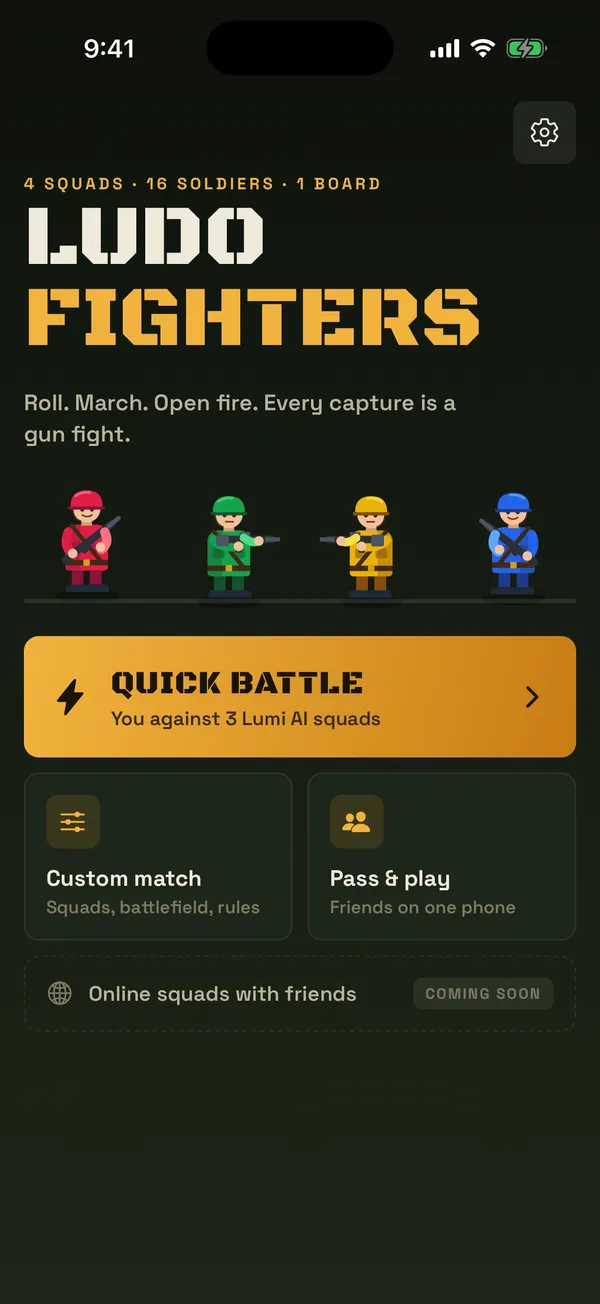
Ludo Fighters home screen showing Play vs Lumi AI, Online squads, Pass and play and Custom match

What you get

Three ways to play, all on one device

When people search for Ludo offline they usually want one of two things: a match against the computer, or a game with friends on the same phone. Ludo Fighters does both today.

  • Play vs Lumi AI

    One tap from the home screen puts you against three Lumi AI squads.

  • Custom match

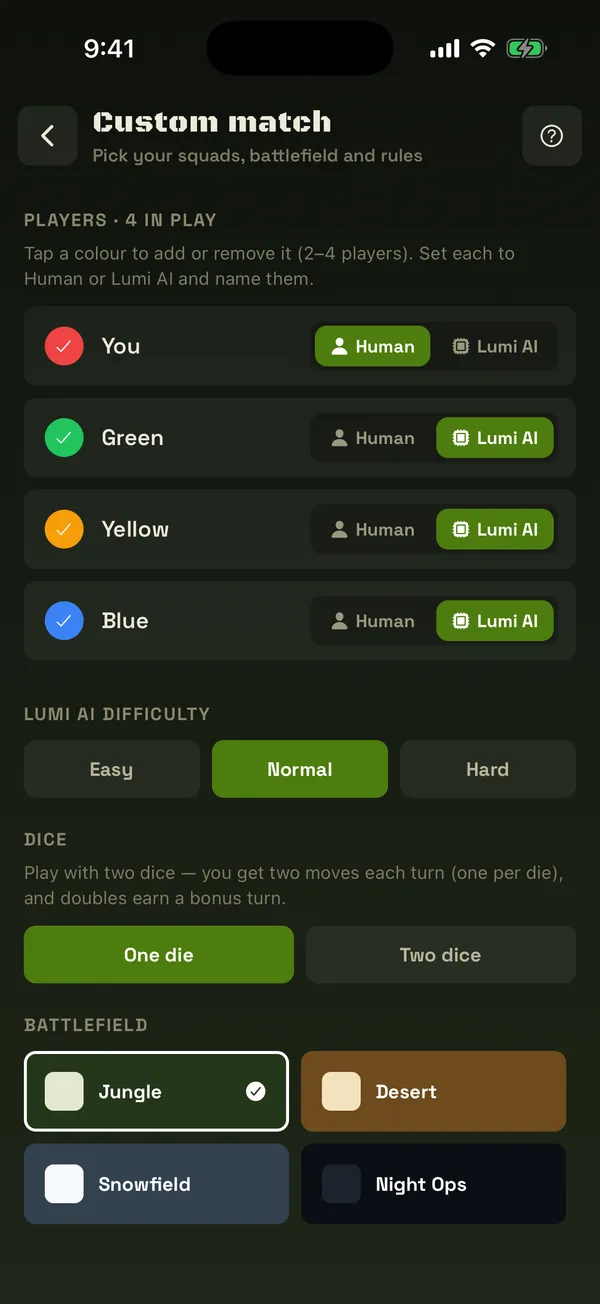
    Choose every seat: Human, Lumi AI or off, two to six squads of one to six soldiers, with the Lumi AI personality, battlefield and house rules you want.

  • Pass & play

    Friends share one phone. The dice panel tells each player when it is their turn.

Want to play people on other phones? That is Online squads, a separate mode with Quick battle and private rooms. See every game mode.

YOULUMI AIOFFLUMI AI

Ludo vs computer

Your opponent is Lumi AI

The computer squads in Ludo Fighters are called Lumi AI. They roll and move on their own, so a solo match flows like a real game instead of a puzzle.

  • Want the classic four-corner game? Play vs Lumi AI gives you three Lumi AI rivals instantly.
  • Want a short duel? In Custom match, turn two colours off and face one Lumi AI squad.
  • Want a team night? Mix human seats and Lumi AI seats in the same match.

Solo comfort

The board turns to face you

In a solo match against Lumi AI the board rotates so your colour always sits in the bottom-left corner, nearest your thumb. Whichever squad you pick, your soldiers start in the same place and march the same way across the screen.

It sounds small, but it means you never read the board upside down, and the moves you learn as Red feel the same when you play as Blue. The rules underneath stay exactly the same: the same 52-square track, home lanes and safe stars you know from classic Ludo rules.

Your base, bottom-left

Pass and play Ludo

Set up a pass-and-play game in 4 steps

Pass & play turns one phone into the board in the middle of the table. Here is how to get a match going with friends or family.

  1. Open Pass & play

    On the home screen, tap the Pass & play tile. It opens the match setup with two human seats, Player 1 and Player 2, on opposite corners of the board.

  2. Choose who sits where

    Switch the other colours on as Human or Lumi AI, or leave them off. Two to six squads can play (five or six use the six-house board), so a pair of friends can fill the empty seats with Lumi AI or keep it a duel.

  3. Type the names and pick the rules

    Give each human seat a name so the turn banner calls the right person, then choose a battlefield and the house rules your table plays by.

  4. Lay the phone flat and play

    Put the phone in the middle of the table. The dice panel lights up for whoever's turn it is, and the far side's panel is turned upside down so the player opposite can read it. That hot-seat switch is on by default.

PLAYER 2PLAYER 1WAITTAP TO ROLLNEXT TURN
Custom match setup screen with each colour set to Human, Lumi AI or off, plus the Lumi AI personality, battlefield and house rules

Playing with younger children? The parents' guide explains the cartoon combat and the settings that soften it.

Tips

How to beat every Lumi AI personality

Each personality plays a different game. Learn what it is doing and you can turn its habits against it.

Rookie

Still learning. Close to half of its moves are random, so it misses captures and wanders into danger.

  • Get two or three soldiers out early and keep them moving: Rookie rarely punishes a spread-out squad.
  • Use it to learn the board, not to grind wins. Move up once you win most matches.

Aggressor

Hunts your soldiers and takes risks to get a capture.

  • Your lead soldier is its favourite target. Walk it from shield bunker to shield bunker instead of sprinting.
  • Its risks are your chances: after it charges, check whether one of your soldiers now sits one to six squares behind it.

Guardian

Careful. Protects its advanced soldiers, likes safe stars and runs from danger.

  • It is careful, so make it choose: two threats at once leave it a square it cannot cover.
  • Stars are where it feels safe. Expect it to wait there, and plan your approach so you land just past.

Strategist

Weighs the whole board: progress, captures and the real odds of each of its soldiers being hit.

  • Do not sit one to six squares in front of an enemy unless you are on a shield bunker.
  • Spend your 6s wisely: an extra soldier on the board gives you more choices on every later roll.

Commander

Plays like Strategist and also looks a turn ahead: for each move, it checks how the next squad could reply to every possible roll.

  • It plans one turn ahead, so think two: set up a capture that only opens after your next move.
  • Keep a soldier back near your start square. Runners have to pass it, and that is your gun fight.
−6−5−4−3−2−1WANTS TO LAND

Guardian, Strategist and Commander look back six squares from the square they want to land on. If an enemy is waiting there, that move scores worse. That is why they are so hard to catch, and why landing on one usually means you planned a turn ahead. Every capture still ends in a short gun fight: see what happens in battle Ludo with soldiers.

At a glance

Solo, pass and play or online?

FeatureSolo vs Lumi AIPass & playOnline squads
Who you play1 to 5 Lumi AI squads2 to 6 people, plus Lumi AI if you likePlayers on other phones; Lumi AI fills empty seats
Phones needed11, sharedOne each
Other players onlineNot neededNot neededNeeded
Board orientationTurns so your colour sits bottom-leftThe far side gets its own dice, facing themTurns so your colour sits bottom-left
House rulesYours, in Custom matchYours, set before the matchHost sets them in a private room; Quick battle uses the classic set
StatusIn the gameIn the gameIn the game

Online squads play as a guest with a callsign: no email, no typed chat, and report or block for any player.

Play anywhere

Loud at the party, silent on the bus

Offline games get played in all kinds of places. Every noisy or busy part of Ludo Fighters has its own switch in Settings.

  • Music

    The menu march, stings and battlefield ambience.

  • Game sounds

    Dice, steps, shots and ricochets.

  • Squad voice

    39 recorded callouts with speech bubbles.

  • Vibration

    Buzz on the big moments.

  • Reduce motion

    Skips gun fights and hops.

  • Settings stay put

    Saved on your phone.

Questions

Playing Ludo offline: FAQ

Can I play Ludo Fighters without other players online?+
Yes. Play vs Lumi AI, Custom match and Pass & play all run on one device, with no other players online needed. Online squads is a separate mode for when you want to play people on other phones.
How do I play Ludo against the computer?+
Tap Play vs Lumi AI on the home screen to face three Lumi AI squads straight away, or open Custom match to choose how many Lumi AI squads you face and which Lumi AI personality you play against.
How many people can play on one phone?+
Up to four. In Pass & play or Custom match each of the four colours can be a human, Lumi AI or switched off, and a match needs at least two squads.
What are the Lumi AI personalities?+
In Custom match you pick one of five. Rookie is still learning and often makes a random move. Aggressor hunts your soldiers and takes risks to do it. Guardian is careful: it keeps soldiers safe and runs from danger. Strategist weighs the whole board and the real odds of being hit. Commander does the same and also looks a turn ahead at how the next squad could reply to every roll.
Can I play quietly, for example on a bus or late at night?+
Yes. Music, game sounds, squad voice and vibration each have their own switch in Settings, and Reduce motion skips the gun fight and hop animations.
Is the game out yet?+
Not yet. Ludo Fighters is coming soon to Google Play and the App Store, with no release date announced.

Ready for Ludo with a little more fire?

Ludo Fighters is coming soon to Android and iPhone. Read up on the rules now and be first in when the squads deploy.